
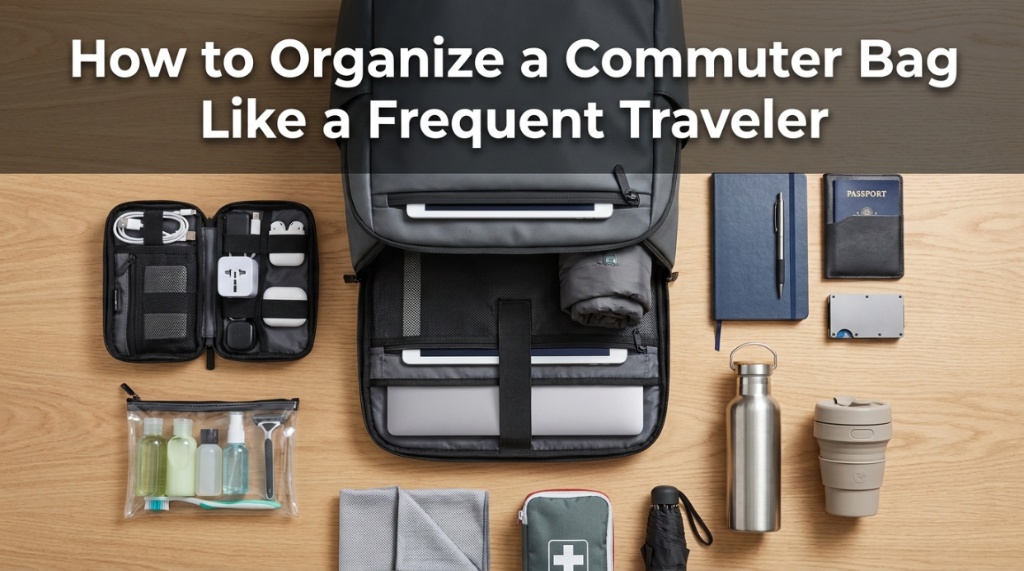
A management consultant who flies 150,000 miles per year can find her passport, laptop charger, and business cards in under three seconds each — without looking inside her bag. That’s not luck or memory. It’s a deliberate commuter bag organization system built on one principle frequent travelers learn through painful experience: every item needs a permanent home inside your bag, and that home never changes. The moment you start tossing items into random pockets or the main compartment, you lose minutes daily to searching — minutes that compound into hours of wasted productivity over a year. Proper commuter bag organization isn’t about being neat. It’s about building muscle memory so your hands find what they need automatically, whether you’re rushing through a subway turnstile or pulling out a charger mid-meeting.
Frequent travelers organize differently than casual commuters because they’ve experienced the cost of disorganization at scale — missed connections because a boarding pass was buried, dead phones because the charger was in the wrong pocket, and professional embarrassment from fumbling through a bag during client meetings. Their systems are tested across thousands of transitions between locations. This guide translates those hard-won commuter bag organization principles into a system any daily commuter can implement immediately — turning your bag from a chaotic catch-all into a precision tool that makes every day smoother. Here’s how professionals who live out of their commuter bag organization systems keep everything accessible, protected, and professional.
What Is the Best Way to Organize a Commuter Bag?
The best organization system divides your bag into four zones — tech zone, work zone, personal zone, and utility zone — with every item assigned a permanent location that never changes regardless of what you’re carrying on any given day.
The four-zone system:
- Zone 1 — Tech (rear compartment): Laptop, tablet, chargers, cables, power bank. Always in the back, closest to your body for weight distribution and protection.
- Zone 2 — Work (main compartment): Notebook, documents, pens, business cards, reading materials. The items you access during meetings and work sessions.
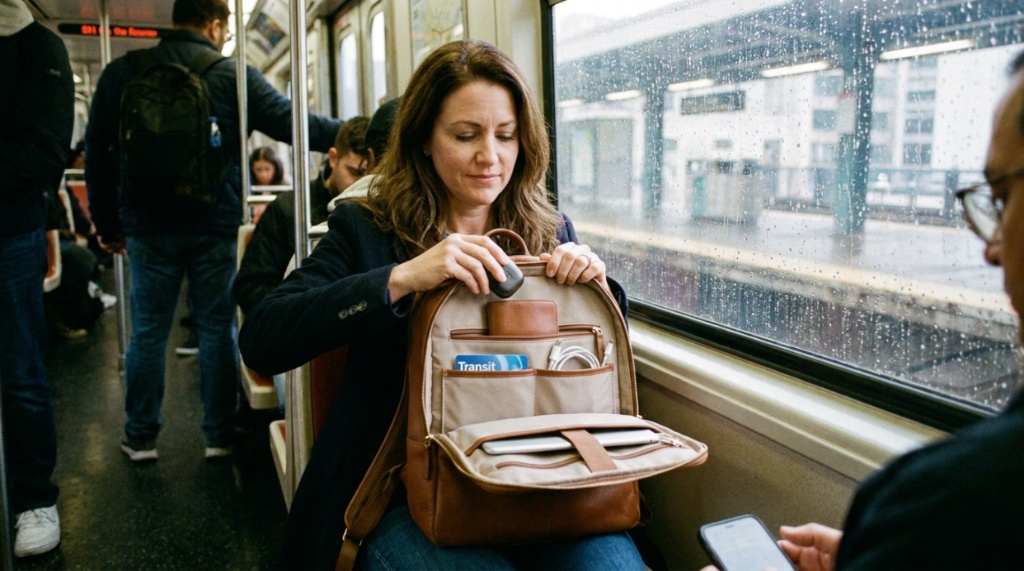
- Zone 3 — Personal (front/external pockets): Phone, wallet, keys, transit card, earbuds, sunglasses. Items accessed multiple times daily without opening the main bag.
- Zone 4 — Utility (side/bottom pockets): Water bottle, umbrella, snacks, tissues, hand sanitizer. Support items accessed occasionally throughout the day.
The rule: items in Zone 3 should be accessible in under 3 seconds. Items in Zone 1 and 2 should be findable in under 10 seconds. If you’re digging for anything longer than that, your organization has failed.
How Do Frequent Travelers Organize Their Tech Gear?
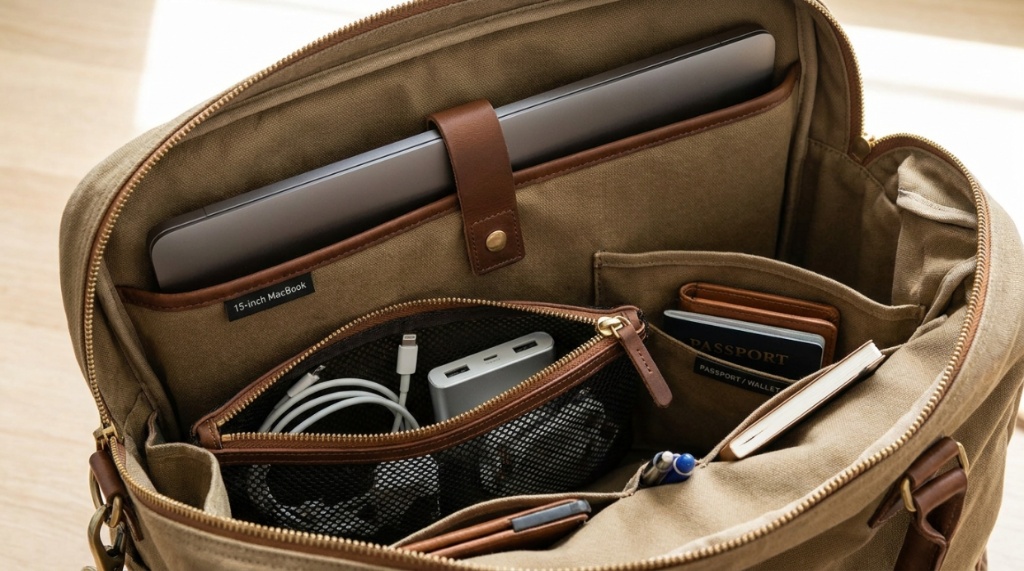
Frequent travelers use a dedicated tech pouch or the bag’s rear compartment exclusively for electronics — with each cable, charger, and adapter in a specific slot that prevents tangling and enables grab-and-go access.
Tech organization principles:
- One pouch for all cables: A slim tech organizer ($15–$30) keeps chargers, cables, adapters, and dongles separated and tangle-free. Never loose in the main compartment.
- Charger always in the same pocket: Whether it’s the bag’s internal organizer or a specific pouch slot, your charger lives in one place permanently.
- Cable management: Velcro cable ties or silicone clips keep each cable coiled individually. Loose cables tangle within hours.
- Power bank position: Accessible without removing the laptop — typically in a side pocket or front compartment with a pass-through port for charging while walking.
Recommended tech organization setup:
- Laptop: rear padded sleeve (never moves)
- Charger + cable: tech pouch, left slot
- Power bank: front pocket or side pocket
- Earbuds: top quick-access pocket or jacket pocket
- Adapters/dongles: tech pouch, right slot
- USB drives (if needed): zippered internal pocket
What’s the Best Way to Organize Daily Essentials for Quick Access?
Assign your phone, wallet, keys, and transit card to external or top-access pockets that you can reach without opening the main compartment — creating a “grab zone” for items accessed 10+ times daily.
Quick-access organization:
| Item | Access Frequency | Ideal Location | Why |
|---|---|---|---|
| Phone | 30+ times/day | External top pocket or jacket | Must be reachable while walking |
| Transit card/phone tap | 2–4 times/day | External front pocket | Needed at turnstiles without stopping |
| Keys | 2–4 times/day | Internal clip or dedicated pocket | Must be findable by touch, not sight |
| Wallet | 3–5 times/day | Secure internal or zippered external | Needs security but regular access |
| Earbuds | 2–3 times/day | Top pocket or case in jacket | Needed at commute start/end |
| Sunglasses | 1–2 times/day | Soft-lined top pocket | Scratch protection + easy access |
The frequent traveler test: can you access your phone, wallet, and keys without looking at your bag? If yes, your quick-access organization works. If you need to look, unzip, or dig — reorganize.
How Do You Prevent Your Bag from Becoming a Mess Mid-Day?
The “one item, one home” rule prevents mid-day chaos: every time you remove an item, it returns to its exact designated spot. No exceptions. No “I’ll organize later.” The system only works if it’s maintained in real-time.
Anti-chaos strategies:
- Return items immediately: Charger comes out for a meeting? Goes back in the same pocket the moment you’re done. Not “later” — now.
- No loose items in main compartment: Everything lives in a pocket, pouch, or sleeve. Nothing floats freely where it can migrate to the bottom.
- Weekly purge (30 seconds): Every Friday, empty your bag completely. Remove receipts, wrappers, random papers, and anything that accumulated. Reset to baseline.
- Designated “inbox” pocket: One small pocket for items that enter your bag during the day (business cards received, receipts, notes). Process this pocket daily — don’t let it overflow.
- Resist the “just throw it in” impulse: The 3 seconds it takes to put something in its proper pocket saves 30 seconds of searching later. Multiply by 10 items per day = 5 minutes saved daily.
What Organization Accessories Do Frequent Travelers Recommend?
A slim tech organizer, a pen case or loop, a key leash, and a small pouch for personal items are the four accessories that transform any commuter bag from a single-compartment catch-all into an organized system.
Essential organization accessories:
- Tech organizer pouch ($15–$40): Bellroy Tech Kit, Peak Design Tech Pouch, or Aer Slim Pouch. Holds cables, chargers, and adapters in individual slots. The single most impactful organization accessory.
- Key leash/clip ($5–$15): Attaches to an internal D-ring so keys are always findable by feel. Eliminates the “keys at the bottom of the bag” problem permanently.
- Pen holder ($5–$10): Leather pen sleeve or elastic loop that keeps 1–2 pens accessible without rolling loose. Small but eliminates daily frustration.
- Small personal pouch ($10–$25): For items like lip balm, hand sanitizer, mints, medication, and tissues. Keeps personal items contained rather than scattered.
- Packing cube (for gym/travel days) ($10–$20): Compresses extra clothing into a contained unit that doesn’t disrupt your daily organization when added to the bag.
How Do You Organize a Bag for Multiple Roles in One Day?
Use a modular system where your core daily carry stays permanently organized, and role-specific items (gym gear, presentation materials, client gifts) add in contained modules that don’t disrupt the base system.
Multi-role organization:
- Morning commute → Office: Core carry only. Laptop, charger, notebook, personal items. Standard four-zone system.
- Office → Client meeting: Add presentation folder or portfolio to work zone. Remove casual items (gym card, snacks) if bag needs to look minimal.
- Office → Gym: Add packable gym bag or packing cube with gym clothes. Keeps gym items separate from work items.
- Office → Evening event: Swap notebook for evening essentials (different wallet, grooming items). Use the “inbox” pocket for event-specific items.
- Office → Airport: Core carry stays identical. Add travel documents to quick-access zone. Attach bag to rolling luggage via pass-through sleeve.
The principle: your base organization never changes. You add modules for specific situations and remove them when done. This prevents the common problem of reorganizing your entire bag for different days.
What Organization Mistakes Waste the Most Time?
Using the main compartment as a single dumping ground, carrying items without designated pockets, and failing to return items to their spots after use are the three mistakes that waste 15–30 minutes weekly in searching and reorganizing.
Time-wasting organization failures:
- The “black hole” main compartment: Everything goes in one big space. Items sink to the bottom. You dig through everything to find anything. Fix: use pouches and the bag’s internal pockets to create sub-zones.
- Charger cable spaghetti: Loose cables tangle with everything. You pull out a knot of wires every time you need one cable. Fix: individual cable ties and a tech organizer pouch.
- Keys at the bottom: Heavy keys sink below everything else. You shake the bag or dump contents to find them. Fix: key clip attached to internal D-ring at a consistent height.
- Receipts and paper accumulation: Random papers fill every pocket over days. Eventually nothing is findable. Fix: designated “inbox” pocket, processed and emptied daily.
- Overstuffing: Cramming too much into a bag designed for less. Zippers strain, items compress each other, nothing is accessible. Fix: reduce carry or size up your bag.
While a high-performance backpack is essential for survival during the daily hustle, your choice of carryall can also be a profound statement of personal style and history. For instance, the thriving community of Vintage Handbag Collectors in New York views bag organization not just through the lens of daily utility, but as a crucial method for preserving rare, decades-old leather craftsmanship while navigating the city. Whether you are packing a utilitarian tech pack or a rare 1970s luxury piece, knowing how to curate your daily essentials is what separates the amateur from the true professional.
How Do You Choose a Bag That Supports Good Organization?
Choose bags with at least 5 distinct pockets/compartments, a dedicated laptop sleeve, one external quick-access pocket, and internal organization features (pen loops, key clips, dividers) rather than bags with one large open compartment.
Organization-friendly bag features:
- Minimum 5 distinct compartments: Laptop sleeve, main compartment, front pocket, top pocket, and at least one internal organizer pocket.
- Internal dividers or slip pockets: Separate documents from notebooks from tech accessories within the main compartment.
- External quick-access pocket: Reachable without opening main zippers. For phone, transit card, or keys.
- Key clip or D-ring: Internal attachment point for keys. Seems minor but eliminates a daily frustration.
- Pen loops: Dedicated pen storage prevents pens from rolling loose and potentially leaking on other items.
- Structured shape: Bags that maintain their shape make internal organization visible and accessible. Collapsed bags hide everything.
Conclusion
Organizing your commuter bag like a frequent traveler means building a system — not just tidying up occasionally. The four-zone approach (tech, work, personal, utility) with permanent item assignments creates muscle memory that saves time every single day. You stop thinking about where things are and start finding them automatically. That’s the difference between a bag that works for you and a bag that works against you.
Implement the system today: empty your bag completely, assign every item a permanent zone and pocket, add a tech organizer pouch if you don’t have one, and commit to the “one item, one home” rule for the next week. By day five, you’ll reach for items without thinking — and wonder how you ever functioned with a disorganized bag.
What’s the item you lose most often in your bag? Share in the comments — I’ll suggest the exact organizational fix for your specific frustration.
Frequently Asked Questions
How many pockets should a well-organized commuter bag have?
Minimum 5 distinct compartments: dedicated laptop sleeve, main compartment with internal dividers, front quick-access pocket, top or side pocket for phone/keys, and at least one utility pocket (water bottle or umbrella). More than 10 pockets often creates confusion — you forget which pocket holds what.
What’s the best tech organizer for a commuter bag?
The Bellroy Tech Kit ($59) and Peak Design Tech Pouch ($60) are the most popular among frequent travelers. For budget options, the Bagsmart Electronics Organizer ($16) provides excellent organization at a fraction of the price. Choose based on how much tech gear you carry daily.
How often should I reorganize my commuter bag?
Do a full empty-and-reset weekly (30 seconds on Friday). Do a quick “inbox pocket” purge daily (10 seconds). If your system is working, you shouldn’t need major reorganization more than once per month. Frequent reorganization signals your system isn’t sustainable.
Should I use packing cubes in my commuter bag?
Only for modular additions (gym clothes, travel items) that aren’t part of your daily carry. Using packing cubes for daily items adds unnecessary bulk and access friction. Reserve them for containing items that enter and leave your bag on specific days.
How do I organize a bag with only one main compartment?
Add structure with pouches: one tech organizer for cables/chargers, one small personal pouch for daily items, and use the bag’s laptop sleeve for your computer. This creates three functional zones within a single compartment. Total cost: $30–$60 in pouches.
What’s the fastest way to find keys in a bag?
Attach a key leash or carabiner to an internal D-ring at a consistent height (mid-bag, not bottom). Your hand goes to the same spot every time and finds keys by touch. This single $5 accessory eliminates the most common daily bag frustration for commuters.
How do frequent travelers handle receipts and papers?
Designate one small pocket as an “inbox” — all incoming papers (receipts, business cards, notes) go there exclusively. Process this pocket daily: scan important items to phone, discard the rest. Never let papers accumulate in random pockets throughout the bag.